
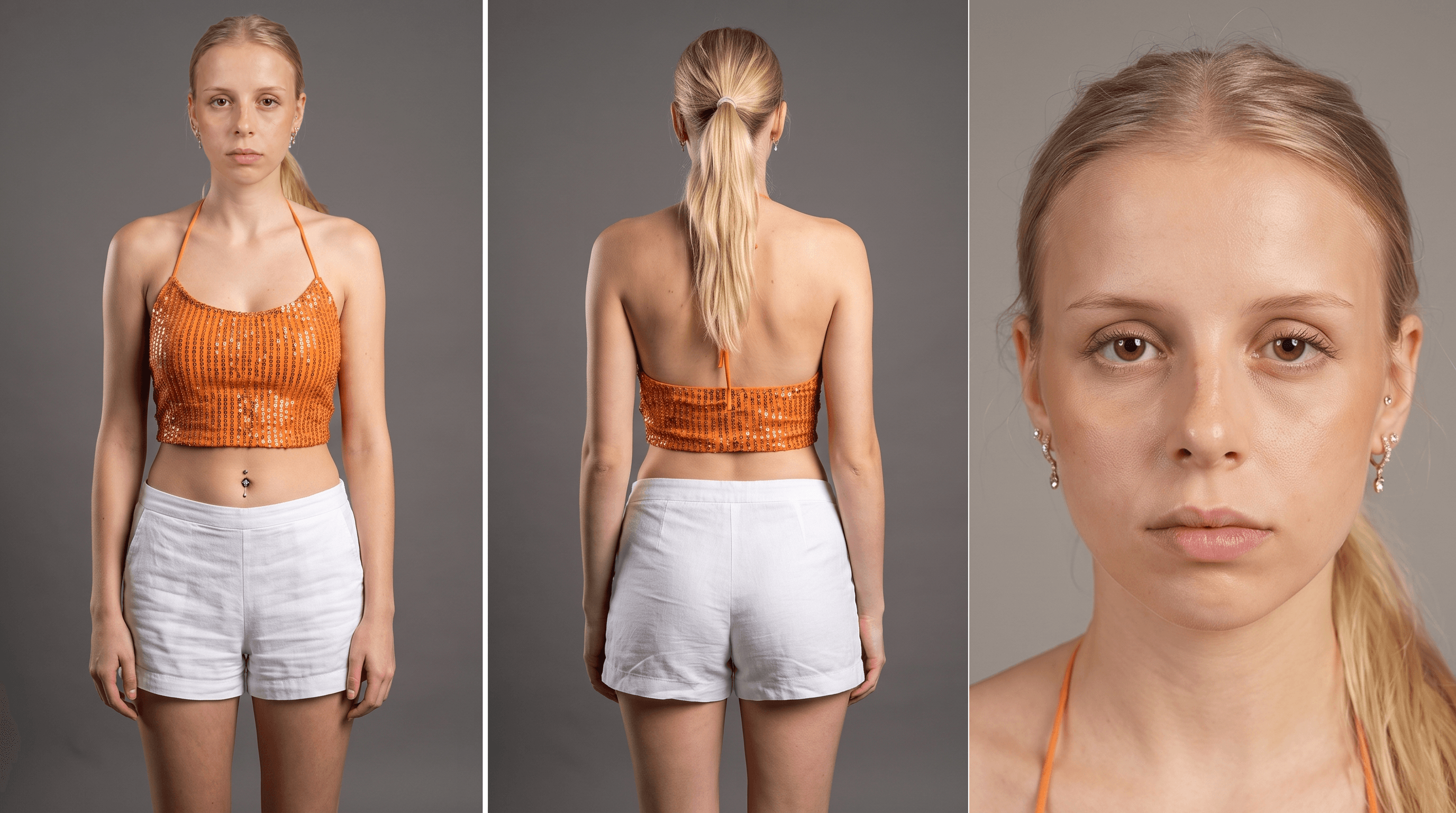
Creating an AI avatar is not simply about generating an attractive face. Build a stable visual identity, a way of speaking and a coherent performance.
What is an AI UGC avatar?
An AI UGC avatar is a digital character designed to communicate like a real creator. They look into the camera, share an experience, demonstrate a product and use the direct language of user-generated content.
AI avatars can be used in social ads, product demonstrations, testimonials, explainers and creative variations for paid media. Their value is not merely that they “look real,” but that they can preserve a recognizable identity while the scene, script or format changes.
Consistency begins before the first video. Define who the character is, how they look, how they speak and what must never change.
The process
How to create an AI avatar in five steps
Define
Define the audience, product, character role and creative angle.
Lock
Lock the face, body, wardrobe, voice and gestures.
Generate
Create reference images first, then scenes and performance.
Direct
Shape intention, pauses and believable imperfections.
Review
Check identity, hands, gaze, product and continuity.
Keep a master version of your character description and change only one variable at a time. This makes it easier to understand which decision produced each result and prevents accidental identity drift.
Prompts 01—03
Build a visual identity you can repeat
These prompts are platform-agnostic. Replace the fields in brackets, attach your reference images whenever the tool supports them and keep the same core character description in every generation.
Three-view character sheet
Create a professional photographic character sheet of the same person: [precise description of age, facial features, hair and build]. They are wearing [complete outfit and colors]. Warm grey studio background with soft, even lighting. Horizontal composition with three views: full body from the front in a neutral pose, full body from the back, and a close-up portrait looking at the camera. Keep the face, proportions, hair, skin and clothing identical. No text, logos, new accessories, cropped hands or feet, or identity changes.
UGC product frame
Use the attached character sheet as a strict identity reference. Vertical 9:16 frame, smartphone camera at eye level. The character is in [everyday setting], holds [product] naturally and looks into the lens as if speaking to a friend. Window light, realistic skin, imperfect but intentional framing, and a lived-in yet uncluttered background. Preserve the exact face, hair, age and outfit. Do not alter the packaging, brand or product text.
Variations without identity drift
Using the approved frame, generate four variations of the same character in the same scene. Change only [gesture / framing / hand position / moment in the action]. Lock facial identity, hair, anatomy, outfit, location, product, lighting and color temperature. All four images should feel like consecutive moments from the same recording.
Tip: describe what you want first and reserve the end of the prompt for restrictions. A strong visual reference should carry more weight than a list of generic adjectives.

Prompts 04—06
Give the avatar something to say—and a human way to say it
A consistent visual identity is not enough. Your character needs copy that sounds spoken and a performance that has been directed. Naturalism is not random noise: every pause, glance and gesture should reveal an intention.
25-second UGC script
Write a 25-second UGC script for [product], aimed at [audience]. The character speaks in the first person as [role or context]. Structure: specific hook, recognizable problem, product discovery, concrete demonstration or benefit, and a soft CTA. Use short sentences, conversational language and one central idea. Avoid empty superlatives, corporate language and unverifiable claims. Deliver the spoken copy and one visual action per line.
Five hooks to test
Create five openings of no more than three seconds for the previous script. Use a different approach for each: confession, common mistake, immediate demonstration, objection and specific result. Each hook must make sense without context, sound spoken and open a question in the viewer’s mind. Do not use ‘Are you tired of…?’ or ‘This product changed my life.’
Video performance direction
Animate the character while preserving identity, anatomy and product. Keep the performance restrained and spontaneous: eye contact mostly into the lens with two brief glances away, irregular blinking, visible breathing, one micro-pause before [key phrase], a subtle self-correction and small hand movements that support the idea. Accurate lip sync, stable head and relaxed shoulders. Avoid a permanent smile, symmetrical gestures, overactive hands and constant motion.
Template
Define your character’s DNA
Complete these fields once and turn them into a fixed block for every prompt. The more specific the identity, the fewer decisions the model will improvise.
- Name and age range
- Role and relationship to the product
- Invariant facial features
- Hair, skin and build
- Wardrobe and color palette
- Voice, accent and pace
- Personality in three words
- Gestures and microexpressions
- Typical locations
- Camera and lighting
- Product shape, color and scale
- Elements that must never change
Recommended anchors: keep one master character sheet, one approved close-up and two successful frames. Always use the same references and base description.
Quality control
Before you publish, look with human eyes
Are the face, age, hair and proportions still the same?
Do the packaging, logo, scale and shape stay accurate?
Does the character connect with the lens without looking rigid or hypnotized?
Do the fingers, grip and contact with the product work frame by frame?
Does the pacing let ideas breathe, and does the emotion match the copy?
Do gestures have intention, or is the character moving just to look alive?
Do lighting, setting, wardrobe and color survive the edits?
Would a real person say it this way? If something distracts you, direct it again.
You do not need technical perfection in every pixel. You need nothing to break the illusion at the moment that matters.
Frequently asked questions
Common questions about AI UGC avatars
What do I need to create an AI UGC avatar?
A precise character description, a consistent visual sheet, a short script and image/video generation tools. Direction and quality control connect all those pieces.
Why does my avatar’s face keep changing?
This usually comes from weak references, contradictory descriptions or changing too many variables at once. Use one master sheet and repeat explicit invariants in every prompt.
How can I make an AI avatar look more human?
Direct the performance: gaze, breathing, pauses, self-corrections and small gestures. Avoid the permanent smile, perfect symmetry and constant movement.
HookCast Studio
Need AI UGC that does not look generated?
We create and direct hyperreal AI avatar ads for brands and agencies.
Start a project ↗